Computer Basics
What is a Computer?
A computer is an electronic device that manipulates information, or "data." It has the ability to store, retrieve, and process
data. You can use a computer to type documents, send email, and browse
the internet. You can also use it to handle spreadsheets, accounting,
database management, presentations, games, and more.
Computers are not very intelligent devices, but they handle
instructions flawlessly and really fast. They take raw data from the user as input, process it and give out information as output.
Data: These are raw facts and figures which may not be arranged systematically or may not convey any proper meaning.
e.g: (1)India independence 1947
(2)computer machine electronic
Information: Information is what we can say is processed data. It is systematic and conveys proper meaning.
e.g: (1) India got Independence in 1947
(2) Computer is an electronic machine
Computer Pictures:
Many misunderstand only desktops to be computers. But actually desktop is a type of computer which is not portable. Laptops are computers which are portable and which can be carried from one place to another.
Parts of a computer
If you use a desktop computer, you might already know
that there isn't any single part called the "computer." A computer is
really a system of many parts working together. The physical parts,
which you can see and touch, are collectively called hardware. (Software, on the other hand, refers to the instructions, or programs, that tell the hardware what to do.)
The illustration below shows the most common
hardware in a desktop computer system. Your system may look a little
different, but it probably has most of these parts. A laptop computer
has similar parts but combines them into a single notebook-sized
package.
1. Monitor:
A
monitor or a
display (also called
screen or
visual display unit) is an
electronic visual display for
computers. The monitor comprises the display device,
circuitry and an enclosure. The display device in modern monitors is typically a
thin film transistor liquid crystal display (TFT-LCD) thin panel, while older monitors use a
cathode ray tube (CRT) about as deep as the screen size.
Originally, computer monitors were used for
data processing while
television receivers
were used for entertainment. From the 1980s onwards, computers (and
their monitors) have been used for both data processing and
entertainment, while televisions have implemented some computer
functionality. The common
aspect ratio of televisions, and then computer monitors, has also changed from 4:3 to 16:9 (and 16:10)
CRT Monitor
TFT/LCD Moniotor
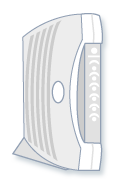
2. Modem:
To connect your computer to the Internet, you need a modem.
A modem is a device that sends and receives computer information over a
telephone line or high-speed cable. Modems are sometimes built into the
system unit, but higher-speed modems are usually separate components.
The
system unit is the core
of a computer system. Usually it's a rectangular box placed on or
underneath your desk. Inside this box are many electronic components
that process information. The most important of these components is the
central processing unit (CPU), or microprocessor, which acts as the "brain" of your computer. Another component is
random access memory (RAM),
which temporarily stores information that the CPU uses while the
computer is on. The information stored in
RAM is erased when the
computer is turned off.
Almost every other part of your computer connects to the system unit using cables. The cables plug into specific ports (openings), typically on the back of the system unit. Hardware that is not part of the system unit is sometimes called a peripheral device or device.
4. Mouse
A mouse is a small device used to point to and select items on your
computer screen. Although mice come in many shapes, the typical mouse
does look a bit like an actual mouse. It's small, oblong, and connected
to the system unit by a long wire that resembles a tail. Some newer mice
are wireless also.
Wireless Mouse
Wired Mouse
5. Keyboard
A keyboard is used mainly for typing text into your
computer. Like the keyboard on a typewriter, it has keys for letters and
numbers, but it also has special keys:
-
The function keys, found on the top row, perform different functions depending on where they are used.
-
The numeric keypad, located on the right side of most keyboards, allows you to enter numbers quickly.
-
The navigation keys, such as the arrow keys, allow you to move your position within a document or webpage.
6. Speakers
Speakers are used to play sound. They may be built into the system unit
or connected with cables. Speakers allow you to listen to music and hear
sound effects from your computer.